Quick Start
Get started with SMTP Servers in just a few minutes. Our service provides a reliable SMTP relay that you can integrate with any application that sends email.
Step 1: Create an Account
Sign up for a free account at smtp-servers.com/signup. After registration, verify your email address to activate your account.
Step 2: Get Your Credentials
Once logged in, navigate to your Customer Dashboard
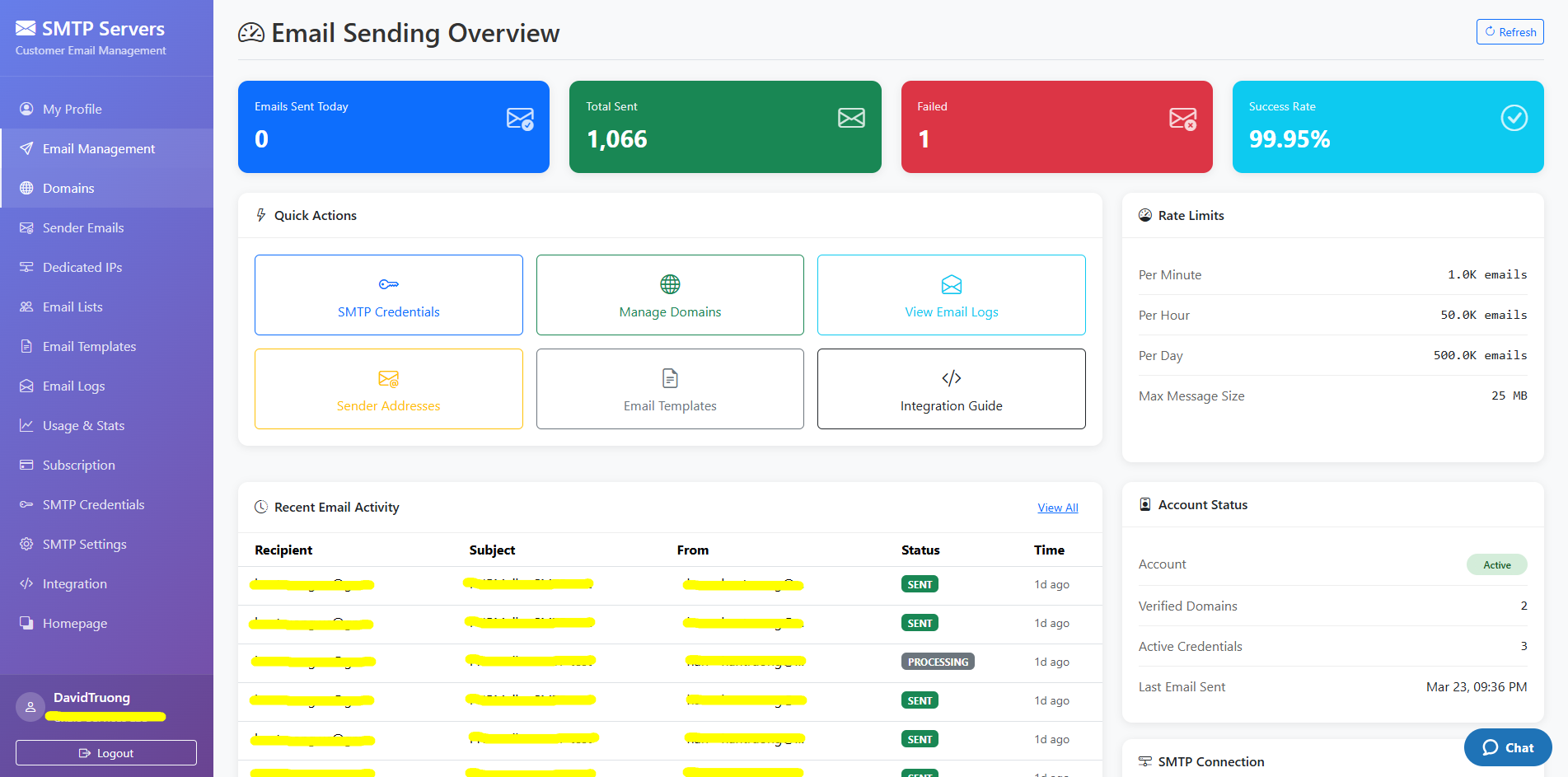
To find your SMTP credentials.
You'll need:
- SMTP Server: relay.smtp-servers.com (port 2525) — or smtp-servers.com for STARTTLS/TLS
- Port: 2525 (recommended) or 587 — both use STARTTLS
- Username: Your SMTP Username
- Password: Your SMTP password
Step 3: Send Your First Email
Configure your application with the credentials above and send a test email:
const nodemailer = require('nodemailer');

const transporter = nodemailer.createTransport({
  host: 'relay.smtp-servers.com',
  port: 2525,
  secure: false,
  auth: {
    user: 'your SMTP username',
    pass: 'your SMTP password'
  }
});

await transporter.sendMail({
  from: 'sender@yourdomain.com',
  to: 'recipient@example.com',
  subject: 'Hello from SMTP Servers!',
  text: 'This is my first email.'
});secure: false and let STARTTLS upgrade the connection — do not use implicit SSL (port 465 is not offered).
Authentication
SMTP Servers uses standard SMTP authentication. We support both PLAIN and LOGIN authentication mechanisms.
Credentials
| Field | Value | Description |
|---|---|---|
Username |
Your SMTP Credential (username) | This is the username created in SMTP Credential page |
Password |
Your SMTP password | This is the password created in SMTP Credential page |
SMTP Settings
Use the following settings to configure your email client or application:
| Setting | Value |
|---|---|
| SMTP Server | relay.smtp-servers.com on port 2525, or smtp-servers.com for STARTTLS/TLS |
| Port | 2525 (recommended) or 587 (submission) |
| Authentication | Required (PLAIN or LOGIN) |
| Encryption | STARTTLS (TLS 1.2 / 1.3) |
Ports
| Port | Host | Encryption | Notes |
|---|---|---|---|
2525 |
relay.smtp-servers.com |
STARTTLS (opportunistic) | Recommended. Best compatibility with firewalls/hosts. |
587 |
smtp-servers.com |
STARTTLS (required) | Standard submission port. STARTTLS is mandatory — auth is only accepted after the connection is upgraded to TLS. |
smtp-servers.com — our TLS certificate is issued
for that name, so strict certificate validation passes. Use relay.smtp-servers.com for plain port 2525.
Both ports use STARTTLS (not implicit SSL on 465); on port 587, authentication is only offered after STARTTLS, so plaintext logins are rejected.
Node.js Integration
Use Nodemailer, the most popular email sending library for Node.js.
Installation
npm install nodemailerSend Email
const nodemailer = require('nodemailer');

// Create transporter
const transporter = nodemailer.createTransport({
  host: process.env.SMTP_HOST || 'relay.smtp-servers.com',
  port: process.env.SMTP_PORT || 2525,
  secure: false, // false for 2525/587 — STARTTLS upgrades the connection
  auth: {
    user: process.env.SMTP_USER,
    pass: process.env.SMTP_PASS
  }
});

// Send email
async function sendEmail() {
  try {
    const info = await transporter.sendMail({
      from: '"Your Name" <sender@yourdomain.com>',
      to: 'recipient@example.com',
      subject: 'Test Email',
      text: 'Plain text content',
      html: '<p>HTML content</p>'
    });
    console.log('Email sent:', info.messageId);
  } catch (error) {
    console.error('Error:', error);
  }
}

sendEmail();
Python Integration
Python's built-in smtplib makes it easy to send emails.
import smtplib
import os
from email.mime.text import MIMEText
from email.mime.multipart import MIMEMultipart

# Configuration
SMTP_HOST = os.environ.get('SMTP_HOST', 'relay.smtp-servers.com')
SMTP_PORT = 2525
SMTP_USER = os.environ.get('SMTP_USER')
SMTP_PASS = os.environ.get('SMTP_PASS')

# Create message
msg = MIMEMultipart('alternative')
msg['Subject'] = 'Test Email'
msg['From'] = 'sender@yourdomain.com'
msg['To'] = 'recipient@example.com'

text = 'Plain text content'
html = '<p>HTML content</p>'

msg.attach(MIMEText(text, 'plain'))
msg.attach(MIMEText(html, 'html'))

# Send email
with smtplib.SMTP(SMTP_HOST, SMTP_PORT) as server:
    server.starttls()
    server.login(SMTP_USER, SMTP_PASS)
    server.send_message(msg)
    print('Email sent successfully!')
PHP Integration
We recommend using PHPMailer for sending emails in PHP.
Installation
composer require phpmailer/phpmailerSend Email
<?php
use PHPMailer\PHPMailer\PHPMailer;
use PHPMailer\PHPMailer\SMTP;
use PHPMailer\PHPMailer\Exception;

require 'vendor/autoload.php';

$mail = new PHPMailer(true);

try {
    // Server settings
    $mail->isSMTP();
    $mail->Host       = 'relay.smtp-servers.com';
    $mail->SMTPAuth   = true;
    $mail->Username   = getenv('SMTP_USER');
    $mail->Password   = getenv('SMTP_PASS');
    $mail->SMTPSecure = PHPMailer::ENCRYPTION_STARTTLS;
    $mail->Port       = 2525;

    // Recipients
    $mail->setFrom('sender@yourdomain.com', 'Your Name');
    $mail->addAddress('recipient@example.com');

    // Content
    $mail->isHTML(true);
    $mail->Subject = 'Test Email';
    $mail->Body    = '<p>HTML content</p>';
    $mail->AltBody = 'Plain text content';

    $mail->send();
    echo 'Email sent successfully!';
} catch (Exception $e) {
    echo "Error: {$mail->ErrorInfo}";
}
?>
Java Integration
Use Jakarta Mail (formerly JavaMail) for sending emails in Java applications.
import jakarta.mail.*;
import jakarta.mail.internet.*;
import java.util.Properties;

public class EmailSender {
    public static void main(String[] args) {
        String host = "relay.smtp-servers.com";
        String username = System.getenv("SMTP_USER");
        String password = System.getenv("SMTP_PASS");

        Properties props = new Properties();
        props.put("mail.smtp.auth", "true");
        props.put("mail.smtp.starttls.enable", "true");
        props.put("mail.smtp.host", host);
        props.put("mail.smtp.port", "2525");

        Session session = Session.getInstance(props,
            new Authenticator() {
                protected PasswordAuthentication getPasswordAuthentication() {
                    return new PasswordAuthentication(username, password);
                }
            });

        try {
            Message message = new MimeMessage(session);
            message.setFrom(new InternetAddress("sender@yourdomain.com"));
            message.setRecipients(Message.RecipientType.TO,
                InternetAddress.parse("recipient@example.com"));
            message.setSubject("Test Email");
            message.setText("Hello from SMTP Servers!");

            Transport.send(message);
            System.out.println("Email sent successfully!");
        } catch (MessagingException e) {
            e.printStackTrace();
        }
    }
}
cURL / Raw SMTP
Test your connection using cURL or telnet for debugging purposes.
# Test SMTP connection with cURL
curl --url 'smtp://relay.smtp-servers.com:2525' \
  --ssl-reqd \
  --mail-from 'sender@yourdomain.com' \
  --mail-rcpt 'recipient@example.com' \
  --user 'your-email@example.com:your-password' \
  --upload-file email.txt
Rate Limits
Rate limits depend on your subscription plan:
| Plan | Emails / Day | Total Emails |
|---|---|---|
| Starter | 250 | 10,000 |
| Business | 1,000 | 50,000 |
| Business Plus | 5,000 | 500,000 |
| Professional | 100,000 | 1,000,000 |
| Enterprise | 500,000 | 5,000,000 |
| Enterprise Elite | 1,000,000 | 50,000,000 |
Error Handling
Always implement proper error handling in your email sending code.
async function sendEmailWithRetry(mailOptions, maxRetries = 3) {
  for (let attempt = 1; attempt <= maxRetries; attempt++) {
    try {
      const result = await transporter.sendMail(mailOptions);
      return result;
    } catch (error) {
      console.error(`Attempt ${attempt} failed:`, error.message);

      if (attempt === maxRetries) {
        throw error;
      }

      // Wait before retrying (exponential backoff)
      await new Promise(r => setTimeout(r, 1000 * attempt));
    }
  }
}
Best Practices
1. Use Environment Variables
Never hardcode credentials in your source code. Use environment variables instead.
2. Implement Retry Logic
Network issues can cause temporary failures. Implement exponential backoff for retries.
3. Validate Email Addresses
Validate recipient email addresses before sending to reduce bounce rates.
4. Use Proper From Address
Use a from address from a domain you own and have properly configured with SPF/DKIM records.
5. Monitor Your Sending
Regularly check your dashboard for delivery rates, bounces, and complaints.
SMTP Response Codes
Common SMTP response codes you may encounter:
| Code | Meaning | Action |
|---|---|---|
250 |
Success | Email accepted for delivery |
421 |
Service unavailable | Retry later |
450 |
Mailbox unavailable | Retry later |
451 |
Local error | Retry later |
452 |
Insufficient storage | Retry later |
500 |
Syntax error | Check your request |
535 |
Authentication failed | Check credentials |
550 |
Mailbox not found | Verify recipient address |
552 |
Message too large | Reduce message size |
Troubleshooting
Connection Timeout
If you're experiencing connection timeouts, ensure port 2525 or 587 is not blocked by your firewall. Some hosting providers block outbound SMTP connections.
Authentication Failed
Double-check your username and password. Ensure you're using your registered email as the username. If you recently changed your password, make sure to update it in your application.
Emails Not Delivering
Check your dashboard for any error messages or bounces. Verify that your sender domain has proper DNS records (SPF, DKIM, DMARC) configured.
Rate Limit Exceeded
If you're hitting rate limits, consider upgrading your plan or implementing queuing in your application to spread out email sending over time.